Mug Mockup: A Practical Tool for Designers, Marketers, and Small Business Owners
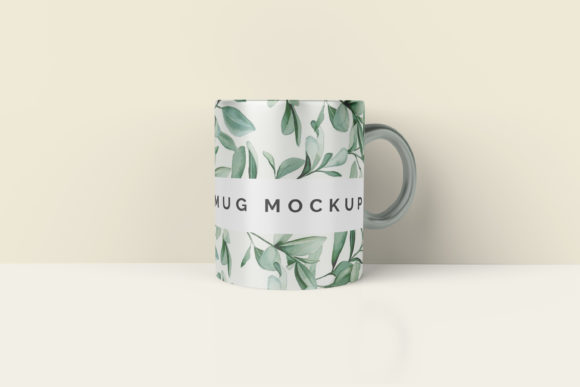
Whether you're launching a new coffee brand, promoting an event, or building a merchandise line, presenting your mug design in a realistic, professional way matters. That’s where a Mug Mockup comes in—not as a standalone design tool, but as a vital bridge between concept and confidence. A Mug Mockup is a digital template that places your artwork, logo, or typography onto a high-fidelity, photorealistic image of a physical mug. It simulates lighting, curvature, shadows, and material texture so your design looks exactly how it will appear in real life—no printing or photography required.
For many creators, the challenge isn’t just *making* a great design—it’s communicating its impact. You might spend hours refining colors and spacing, only to share a flat PNG file that fails to convey scale, context, or emotional appeal. Stakeholders hesitate. Clients ask, “But how will it look on the actual mug?” Print partners request mockups before production. Social media audiences scroll past static graphics—but stop for something that feels tangible and intentional. These are the everyday situations where a Mug Mockup shifts perception from “maybe” to “yes.”
Why Realism Matters More Than You Think
Human brains process visual context instantly. A design centered on a white background tells one story; the same design wrapped around a matte ceramic mug with soft ambient light tells another—one of warmth, usability, and authenticity. That realism directly supports decision-making. When you present a Mug Mockup to a café owner considering branded mugs, they’re not evaluating pixels—they’re imagining customers holding it, seeing it on their counter, or spotting it in a photo on Instagram. The mockup anchors imagination in reality.
This is especially critical for remote collaboration. Freelance designers working with global clients, small-batch makers pitching to retailers, or nonprofit teams seeking donor-approved swag—all benefit from eliminating ambiguity. A well-chosen Mug Mockup reduces back-and-forth, speeds up approvals, and builds trust before a single mug is printed.
Practical Uses Across Roles
Different users lean into Mug Mockup tools for distinct outcomes—and each use case reveals how versatile the approach really is:
- Product Launches: E-commerce sellers use Mug Mockup files to populate Shopify or Etsy listings with lifestyle images—showing the mug beside a steaming cup, on a wooden table, or held by a hand—without hiring a photographer.
- Brand Consistency: Marketing teams maintain visual standards across channels by applying logos and color palettes to the same Mug Mockup file—ensuring the handle position, gloss level, and shadow direction stay uniform from email banners to Instagram ads.
- Crowdfunding & Pre-Orders: Creators building momentum on platforms like Kickstarter embed Mug Mockup visuals in pitch decks and update posts. Backers respond more confidently when they can visualize the final product—not just read about it.
- Internal Alignment: Designers share layered PSD or smart-object mockups with copywriters and web developers, enabling them to preview how text wraps around the mug’s curve or how much space remains for a QR code near the base.
Choosing the Right Mug Mockup—Beyond Aesthetics
Not all Mug Mockups deliver equal value. What makes one truly useful isn’t just resolution or style—it’s flexibility and fidelity. Look for mockups that offer:
- Smart Object Compatibility: Especially in Photoshop, this lets you drop your design into a pre-configured layer that auto-adjusts to the mug’s shape, avoiding manual warping or distortion.
- Multiple Angles & Environments: Front, 3/4, top-down, and in-context scenes (e.g., on a kitchen shelf or next to a laptop) let you tailor visuals to specific goals—product pages vs. social carousels vs. pitch decks.
- Realistic Material Options: Matte ceramic, glossy porcelain, bamboo composite, or travel tumbler variants help match your actual product—and signal attention to detail to discerning buyers.
- Transparent Backgrounds & Layered Files: Essential for quick resizing, compositing into larger scenes, or adapting for print-ready PDFs and web banners.
Free resources exist—but often lack consistency or commercial licensing. For professional use, investing in a curated pack from trusted sources (like Placeit, Smartmockups, or independent designers on Creative Market) pays off in time saved, brand credibility, and legal safety—especially when sharing mockups publicly or with clients.
Getting Started Without Overcomplicating It
You don’t need advanced design skills to benefit from a Mug Mockup. Many modern tools now offer browser-based editors: upload your logo, drag it into place, adjust size and rotation, and download in seconds. Others integrate directly with Canva or Figma—ideal if your workflow lives there. The key is starting simple: pick one high-quality Mug Mockup that matches your most common use case (e.g., a classic white ceramic mug with front-and-side views), master that file, and build from there.
Also consider your audience’s expectations. A boutique roaster targeting eco-conscious buyers may prioritize mockups showing recycled-material mugs with subtle textures and natural lighting. A tech startup launching limited-edition swag might opt for sleek, minimalist mockups with bold contrast and clean negative space. Let your brand voice guide your mockup choice—not the other way around.
What a Mug Mockup Doesn’t Do (And Why That’s Okay)
A Mug Mockup won’t replace physical sampling—but it dramatically reduces how many samples you need. It won’t fix a poorly designed logo—but it will expose layout issues early (e.g., text getting lost near the handle or bottom rim). And it won’t guarantee sales—but it strengthens every touchpoint where perception shapes action: investor meetings, retailer pitches, customer emails, and ad creatives.
The real power lies in efficiency and empathy. With a reliable Mug Mockup in your toolkit, you spend less time explaining and more time iterating. You invite feedback grounded in realism—not speculation. You show respect for your audience’s time and attention by delivering visuals that feel finished, intentional, and human-centered.
Next Steps You Can Take Today
If you haven’t used a Mug Mockup yet, start small: find one free, well-reviewed mockup online, open it in Photoshop or a compatible editor, and insert your current logo or slogan. Notice how the placement changes your perception of balance and hierarchy. Then try exporting it for two different uses—a LinkedIn post announcing a new product line and a PDF one-pager for a vendor meeting. Compare how each version lands.
Over time, build a personal library—organized by mug type, orientation, and background context—so you can respond quickly when opportunity arises. Treat your Mug Mockup collection like any other essential resource: updated, tested, and aligned with how your audience actually experiences your brand.
Because at its core, a Mug Mockup isn’t about perfection. It’s about clarity. Confidence. Connection. And turning a simple idea—a mug with your message—into something people want to hold, share, and remember.