iPhone X Mockup V2: A Practical Tool for Visualizing Ideas
Whether you're launching a new app, pitching a design concept, or updating your portfolio, how you present your work matters. The iPhone X Mockup V2 is more than just a digital frame—it’s a versatile, realistic, and accessible way to showcase interface designs, branding elements, and user experiences on one of Apple’s most iconic devices.
What Exactly Is the iPhone X Mockup V2?
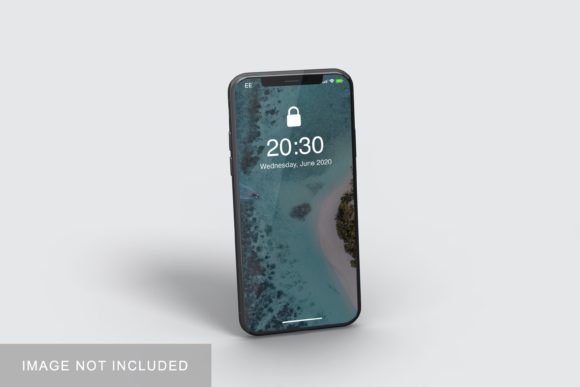
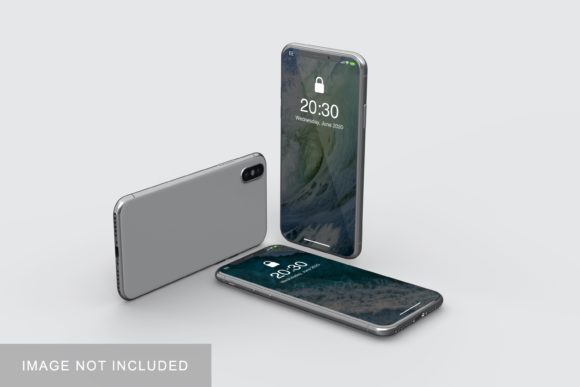
The iPhone X Mockup V2 is a high-fidelity, layered PSD or Figma-compatible template that replicates the physical form, lighting, depth, and subtle curvature of the original iPhone X. Unlike basic wireframe placeholders, this version includes refined shadows, screen reflections, dynamic perspective options, and smart object support—meaning you can drop your design into the screen area with a single click and instantly see how it looks in context.
It’s not a 3D render or an animated model—but rather a carefully crafted 2D representation optimized for clarity, realism, and ease of use. Think of it as a “digital stage” where your UI, screenshots, or marketing visuals take center stage—without needing photography, studio lighting, or expensive rendering software.
Who Benefits Most from This Mockup?
The iPhone X Mockup V2 serves a surprisingly wide range of users—each with distinct needs:
- App designers & developers who want to preview how their interface behaves within real-world constraints (e.g., notch placement, rounded corners, status bar height).
- Marketing professionals preparing social media assets, landing pages, or pitch decks—where authenticity boosts credibility and engagement.
- Freelancers and agencies building client-facing presentations; showing work “in situ” helps stakeholders visualize final outcomes faster.
- Educators and students demonstrating design principles, interaction patterns, or accessibility considerations on a widely recognized device form factor.
- Small business owners creating simple app store screenshots or website banners—no design background required.
Key Features That Make It Stand Out
Not all mockups are created equal. Here’s what sets the iPhone X Mockup V2 apart:
- Smart Object Integration: Insert your design once, and updates propagate across all views (front, angled, and shadowed variants) without manual repositioning.
- Multipurpose Angles: Includes front-on, 30-degree tilt, and side-profile views—ideal for diverse layout needs like hero sections, comparison grids, or case study thumbnails.
- Realistic Lighting & Depth: Subtle ambient occlusion, soft screen glow, and accurate bezel gradients mimic how light interacts with glass and metal—no extra editing needed.
- Cross-Platform Ready: Available in layered PSD (for Photoshop users) and Figma (.fig) formats—ensuring compatibility whether you’re on Mac, Windows, or browser-based workflows.
- Non-Destructive Layers: Backgrounds, shadows, and device frames remain fully editable and toggleable—giving you control over composition without compromising fidelity.
Where and How People Actually Use It
Real-world usage goes beyond static image exports. Here are practical examples:
- A fitness app startup uses the iPhone X Mockup V2 to display three key screens—a workout timer, progress dashboard, and community feed—in their Kickstarter campaign. The consistent device framing builds visual cohesion and trust.
- A UX student incorporates it into their capstone presentation, rotating between angles to highlight gesture navigation and safe-area awareness—making abstract concepts tangible for non-technical reviewers.
- A local café owner drops a seasonal menu promo into the mockup and shares it directly to Instagram Stories. Followers instantly recognize the familiar iPhone X shape—increasing relatability and scroll-stopping impact.
- A design agency embeds the mockup into interactive prototypes (via Figma’s auto-layout or InVision hotspots), letting clients tap through flows while staying anchored in a realistic environment.
Strengths—and Honest Considerations
The iPhone X Mockup V2 excels at speed, consistency, and professionalism—but it’s important to know its place in your toolkit:
Strengths:
- Significantly reduces time spent on photo editing or 3D setup.
- Helps maintain brand alignment across multiple touchpoints (website, pitch deck, social posts).
- Supports rapid iteration—swap designs, test color schemes, or compare layouts in under a minute.
Considerations:
- It reflects the iPhone X specifically—not newer models. If your audience primarily uses iPhone 14 or later, consider pairing it with updated mockups for full coverage.
- While highly realistic, it doesn’t simulate motion, haptics, or real-time interaction. For usability testing or advanced prototyping, pair it with functional tools like Figma’s interactive components or ProtoPie.
- The notch and rounded corners require thoughtful layout planning. Always check your content against the safe area guides included in the file.
How to Evaluate If It Fits Your Needs
Ask yourself these questions before downloading or purchasing:
- Is visual context more important than interactivity? If yes—the iPhone X Mockup V2 delivers immediate value.
- Do you need consistency across multiple projects or team members? Its standardized format makes asset handoff smoother and review cycles faster.
- Are you targeting audiences familiar with iOS aesthetics? The iPhone X remains culturally resonant—even years after release—especially among design-savvy or tech-aware viewers.
- Do you already use Photoshop or Figma? Since it’s built for those platforms, no new software investment is required.
If most answers are “yes,” the iPhone X Mockup V2 is likely a smart addition—not just as a one-off graphic, but as part of a repeatable, scalable workflow.
Getting the Most Out of It—A Few Pro Tips
You don’t need advanced skills to maximize this tool. Try these simple techniques:
- Use layer masks to reveal only portions of your design—great for highlighting micro-interactions or transitions.
- Overlay subtle textures (like paper grain or brushed metal) on the background layer to add warmth and contrast without distracting from the screen content.
- Export at multiple sizes: 1x for web previews, 2x for retina displays, and cropped versions for social avatars or email headers.
- Pair with complementary mockups—like iPad or MacBook templates—to show responsive behavior across device types.
Final Thought: Clarity Over Complexity
In a world saturated with flashy tools and ever-shifting trends, the iPhone X Mockup V2 stands out by doing one thing exceptionally well: helping people communicate ideas clearly. It doesn’t promise AI-powered generation or cinematic animations—but it does deliver reliability, realism, and respect for your time.
Whether you’re refining a prototype, polishing a portfolio, or simply trying to make your next update feel more human and grounded, this mockup quietly supports your goals—without demanding attention itself. And sometimes, that’s exactly what great tools are meant to do.