Stylist DL Flyer Mockup: A Practical Tool for Visual Communication and Brand Consistency
Visual communication is rarely about raw design alone—it’s about context, credibility, and clarity. When a stylist, boutique owner, or creative professional prepares to promote a new collection, seasonal service, or pop-up event, the flyer isn’t just a piece of paper or digital file. It’s a first impression, a tactile extension of brand identity, and often, the deciding factor in whether someone pauses, reads, and acts. That’s where the Stylist DL Flyer Mockup becomes more than a presentation aid—it functions as a bridge between conceptual design and real-world reception.
What Exactly Is a Stylist DL Flyer Mockup?
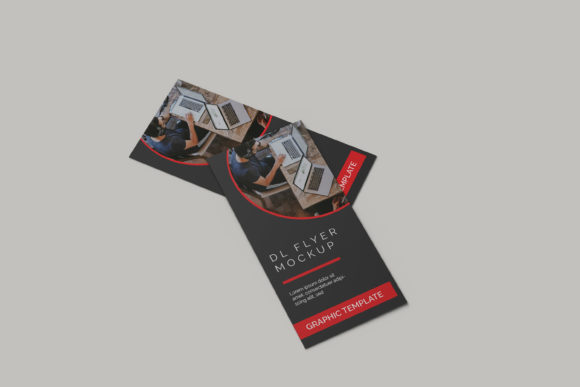
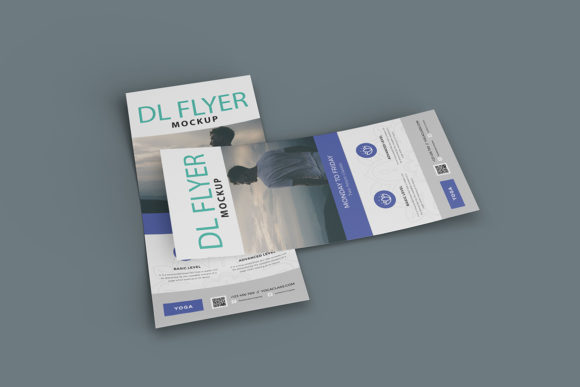
A DL flyer refers to a standard European print format measuring 99 mm × 210 mm—roughly one-third of an A4 sheet. It’s widely used across salons, fashion studios, wellness centers, and lifestyle brands because it fits neatly into mailers, display racks, and handouts without overwhelming the viewer. A Stylist DL Flyer Mockup is a high-fidelity digital template that simulates how a designed flyer appears in physical or environmental contexts: held in a hand, pinned to a corkboard, resting on a marble countertop, or displayed beside a mannequin in a boutique window.
Unlike generic flyer templates, stylist-oriented mockups are built with intentional realism. They include subtle textures—linen paper grain, soft shadow diffusion, gentle curvature at folded edges—and contextual cues like ambient lighting, reflective surfaces, and even faint background elements (e.g., blurred fabric swatches or minimalist shelving) that reinforce industry relevance. These details aren’t decorative flourishes; they serve functional roles in client presentations, internal alignment, and pre-press evaluation.
Why Contextual Realism Matters More Than You Think
Designers often underestimate how much perception shifts when a flat PDF moves into a three-dimensional setting. A bold sans-serif headline may look confident on screen—but when rendered on textured recycled paper under warm retail lighting, its weight and spacing can appear heavier or looser than intended. Similarly, a vibrant coral accent might pop against white studio backgrounds but mute next to terracotta tiles or olive-green walls.
The Stylist DL Flyer Mockup addresses this gap by embedding photorealistic variables directly into the preview layer. For example, some versions simulate matte versus glossy finishes, allowing stylists to assess how ink density interacts with surface sheen. Others offer multiple placement options—propped upright on a vanity, tucked into a garment tag, or stacked with other promotional materials—so creators can anticipate visual hierarchy in situ.
This realism supports decision-making beyond aesthetics. A bridal stylist evaluating a “Bridal Consultation Package” flyer can test whether the call-to-action button remains legible when viewed from 1.5 meters away—a common distance in salon waiting areas. A sustainable fashion educator might use the same mockup to compare how eco-certification badges render on uncoated stock versus digital screens, ensuring transparency stays visible, not vague.
Practical Applications Across Diverse Roles
The versatility of the Stylist DL Flyer Mockup emerges most clearly when viewed through the lens of actual workflows—not theoretical ones. Below are concrete examples drawn from real practice:
- Freelance Stylists: Use the mockup to present seasonal mood boards to clients before finalizing color palettes or typography. Seeing their logo and tagline on a simulated linen DL flyer helps them gauge tone—playful versus polished, minimalist versus expressive—without committing to print runs.
- Boutique Owners: Integrate the mockup into inventory planning. When launching a capsule collection, they overlay product shots onto the DL layout, then preview how the flyer would sit beside garments on a shelf. This reveals spatial conflicts—like oversized QR codes obscuring garment labels—or opportunities, such as aligning flyer colors with current window displays.
- Creative Educators: In fashion communication courses, instructors assign students to build DL flyers using real brand guidelines, then place them in varied mockup scenes. The exercise trains visual judgment: Why does the same design feel urgent in a café setting but static in a spa environment? How does font contrast hold up under diffused light versus direct spotlight?
- Small-Business Marketers: Instead of commissioning custom photography for every campaign, they reuse a single Stylist DL Flyer Mockup with updated content. One version shows the flyer beside a vintage hair dryer (for retro styling workshops); another places it atop a folded silk scarf (for luxury accessory launches). Consistency builds recognition; variation maintains freshness.
- Researchers Studying Consumer Response: Some academic teams use stylized DL mockups as controlled stimuli in eye-tracking studies. Because the physical dimensions and viewing angles are standardized, differences in gaze patterns reflect genuine cognitive responses—not artifacts of inconsistent presentation.
Key Characteristics That Set It Apart From Generic Mockups
Not all DL flyer mockups deliver equal utility. The most effective versions share several distinguishing traits:
- Smart Layer Organization: PSD or Figma files separate background, shadow, paper texture, and editable content layers cleanly—so users can toggle ambient lighting or swap surfaces (wood, concrete, brushed metal) without repositioning design elements.
- Print-Ready Output Options: Beyond screen previews, advanced versions generate CMYK-optimized JPEGs and PDF/X-4 exports with embedded bleed and crop marks—bridging the gap between mockup and production.
- Adaptive Lighting Controls: Sliders or adjustment layers let users simulate morning light (cool, directional), overcast daylight (soft, even), or evening retail lighting (warm, focused)—revealing how color fidelity shifts across conditions.
- Contextual Typography Guidance: Many include subtle overlays suggesting optimal type sizes for body copy (minimum 8 pt for readability at arm’s length) and headline treatments that avoid distortion on curved surfaces.
- Multilingual Layout Support: Since DL flyers circulate internationally—from Berlin salons to Tokyo boutiques—top-tier mockups accommodate right-to-left text flow and variable line heights for languages like Arabic or Thai without breaking alignment.
Real-World Considerations Before Implementation
Despite its advantages, deploying the Stylist DL Flyer Mockup effectively requires attention to practical constraints:
First, resolution matters—but not always in the way people assume. While high-res mockups (300+ DPI) are essential for print proofs, they can slow down collaborative editing in cloud-based tools. Savvy teams maintain two versions: a lightweight 72-DPI variant for rapid feedback loops and a full-resolution file reserved for final sign-off.
Second, accessibility shouldn’t be an afterthought. A visually rich mockup may obscure low-contrast text or small icons. Best practice is to validate color contrast ratios (at least 4.5:1 for body text) directly within the mockup environment—some designers embed WCAG-compliant swatch libraries alongside their templates.
Third, cultural resonance influences more than imagery. A DL flyer mocked up on a Scandinavian oak table conveys precision and calm—ideal for mindfulness-focused stylists—but may feel incongruent for a vibrant Afro-Caribbean hair artistry brand, where warmer tones and bolder textures better reflect community values. Choosing context intentionally strengthens authenticity.
How It Fits Into Broader Design and Marketing Workflows
The Stylist DL Flyer Mockup rarely stands alone. It’s typically one node in a larger ecosystem:
- Pre-Design Phase: Used to gather stakeholder input—e.g., “Does this layout feel premium enough for our VIP launch?”—before any vector work begins.
- Mid-Process Alignment: Shared with printers to confirm how spot colors translate to coated vs. uncoated stock, reducing revision cycles.
- Post-Launch Analysis: Paired with analytics (e.g., QR code scans, in-store redemption rates) to correlate visual execution with engagement metrics. If flyers placed near mirrors outperform those near entrances, the mockup helps reconstruct why—was it lighting? Proximity to reflection? Placement height?
In hybrid environments—where physical flyers coexist with Instagram Stories and email banners—the DL mockup also serves as a consistency anchor. Designers use it to extract exact hex values, spacing ratios, and icon proportions, then replicate those into digital assets. This cross-medium harmony reinforces brand cohesion without demanding identical formats.
Emerging Trends Shaping Its Evolution
Looking ahead, the Stylist DL Flyer Mockup is adapting to new expectations:
Augmented reality integration now allows stylists to project mockups into real spaces via mobile devices—seeing how a flyer looks taped to their actual studio door before printing. Sustainability tracking features are appearing too: some mockups include optional overlays showing carbon footprint estimates based on paper weight and ink coverage, helping eco-conscious creators make informed trade-offs.
There’s also growing demand for “living mockups”—files that auto-update when linked design systems change. If a brand refreshes its primary typeface, the DL mockup adjusts typographic hierarchy in real time, preserving proportion and rhythm without manual tweaking.
These developments don’t replace human judgment—they extend it. The Stylist DL Flyer Mockup remains most powerful when treated not as a shortcut, but as a calibrated instrument: one that clarifies intention, exposes assumptions, and grounds creativity in tangible experience.