Two Books Mockup: A Practical Tool for Designers, Authors, and Publishers
When you're presenting a book concept—whether it's a novel, a coffee-table photography collection, or a corporate training manual—the way it looks matters just as much as what it says. That’s where the Two Books Mockup steps in: not just a visual placeholder, but a strategic communication tool that bridges imagination and reality.
What Exactly Is a Two Books Mockup?
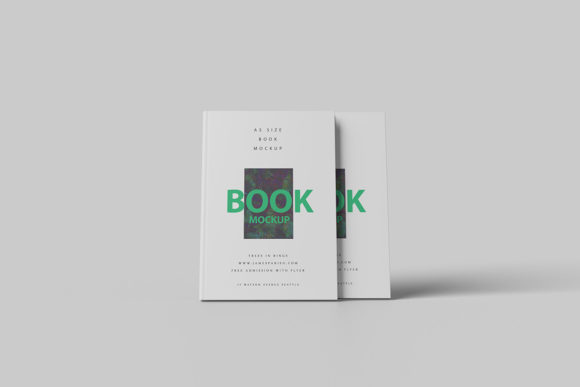
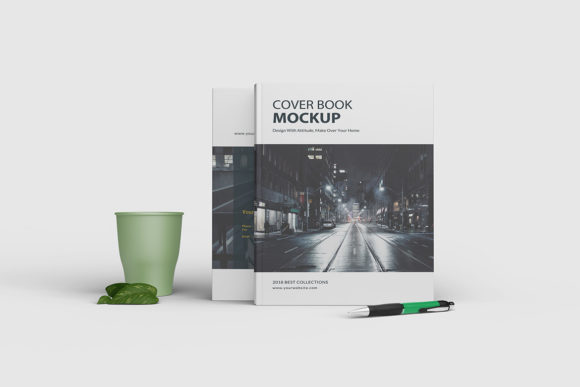
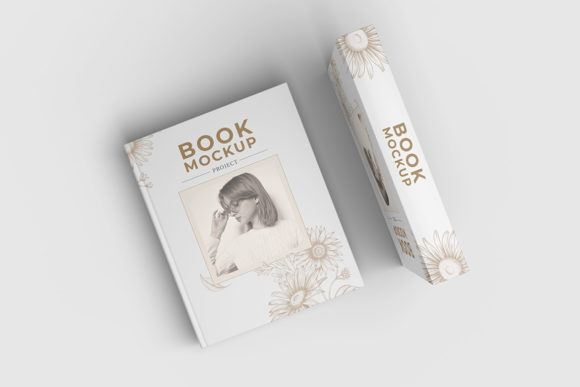
A Two Books Mockup is a high-fidelity digital template that displays two book covers (and often spines and partial interiors) in a realistic, context-aware scene—like stacked on a wooden desk, angled on a shelf, or resting beside a laptop and notebook. Unlike flat PSD layers or basic 3D renders, modern Two Books Mockup files are typically smart-object compatible, layered, and fully editable in Photoshop or compatible editors like Affinity Photo or Photopea.
Crucially, it’s not about showing one book in isolation. The “two” element introduces subtle but powerful design dynamics: contrast, comparison, sequencing, and narrative flow. You might use it to show Volume I and Volume II of a series, a before-and-after redesign, or even parallel editions—hardcover vs. paperback, English vs. translated version.
Why Two—Not One or Three?
There’s intention behind the number. A single-book mockup works well for hero shots or e-commerce thumbnails. But when you’re pitching to stakeholders, refining branding, or preparing marketing assets, seeing two books side-by-side delivers richer context:
- Visual rhythm: Two creates balance without symmetry—ideal for social media carousels or presentation slides where hierarchy and movement matter.
- Storytelling potential: It implies progression, duality, or expansion—think “foundation + application,” “theory + practice,” or “past + future.”
- Efficiency in feedback: Clients and editors can compare typography, color treatment, or cover imagery instantly—no flipping between tabs or documents.
This isn’t arbitrary aesthetics. In publishing workflows, reducing back-and-forth revision cycles saves time and budget. A well-chosen Two Books Mockup helps align expectations early—before print proofs or final layouts are locked in.
Key Qualities That Make a Two Books Mockup Effective
Not all mockups deliver equal value. Here’s what separates a functional asset from a truly useful one:
Realistic Lighting and Perspective
The best Two Books Mockup files simulate natural light direction, subtle shadows, and accurate perspective distortion. If your books appear to float unnaturally or cast mismatched shadows, credibility drops—even if the design itself is strong. Look for mockups shot with real lighting setups (not purely CGI), especially those offering multiple light variants (warm, cool, studio, ambient).
Smart Object Integration
You shouldn’t need to manually mask, warp, or adjust layer blending every time you swap in new cover art. Smart-object compatibility means double-clicking a layer opens your design in its own document—then saving updates the mockup automatically. This is non-negotiable for fast iteration.
Customizable Environment Elements
Top-tier Two Books Mockup templates let you toggle or recolor background textures (marble, oak, linen), adjust surface reflections, or even replace props—like swapping a ceramic mug for a pair of reading glasses. That flexibility ensures your mockup fits the brand tone: minimalist tech startup? Clean white surface. Artisanal poetry press? Warm-toned reclaimed wood.
Resolution and Format Readiness
Whether you’re exporting for Instagram (1080×1350), a pitch deck (1920×1080), or a printed sales sheet (300 DPI at 8.5×11"), your Two Books Mockup should support high-resolution output without pixelation. Bonus points if it includes vector-based elements or scalable shadows.
Where a Two Books Mockup Fits Into Real Workflows
It’s easy to think of mockups as “just for show”—but in practice, they’re embedded across stages of creation and distribution:
Early-Stage Concepting
Authors drafting proposals for literary agents often include a Two Books Mockup to visualize how their manuscript might sit alongside comparable titles on a bookstore shelf. It signals market awareness—not just creative vision.
Design Collaboration
Graphic designers working with freelance illustrators use these mockups to test how hand-drawn cover art translates in context. Does the texture hold up next to bold sans-serif type? Does the spine color pop against the background? Answers emerge faster when both books are rendered together.
Publishing & Marketing Prep
Marketing teams build launch campaigns around visuals—and a Two Books Mockup serves dual roles here. It becomes the foundation for email headers, Amazon storefront banners, and even AR previews for apps. When promoting a boxed set or companion guide, showing both volumes in situ builds perceived value before the first page is read.
Choosing the Right Two Books Mockup: What to Consider
Selecting wisely prevents wasted time and inconsistent outputs. Ask yourself:
- What’s your primary use case? Pitching to traditional publishers? Then opt for elegant, neutral settings—no distracting props. Promoting indie fiction on TikTok? Choose dynamic angles, shallow depth of field, and lifestyle context (e.g., books beside a steaming mug and sunlit window).
- Do you need print-ready fidelity? Check if shadows and highlights are rasterized at 300 DPI—or if they rely on low-res overlays that blur when scaled.
- Is licensing clear and commercial-friendly? Some free mockups restrict use in client work or require attribution. For professional projects, invest in licensed packs with extended rights—especially if you’ll reuse the same mockup across multiple titles.
- How much control do you need over realism? Some designers prefer hyper-realistic mockups with paper grain and ink sheen. Others prioritize clean, stylized minimalism. Match the aesthetic to your audience’s expectations—not just your personal taste.
Common Pitfalls—and How to Avoid Them
Even experienced users stumble. Watch out for:
- Overloading the scene: Adding too many props (plants, pens, coffee stains) competes with the books. Let the Two Books Mockup serve the content—not distract from it.
- Ignoring scale consistency: If one book appears significantly thicker or taller than the other without justification (e.g., differing page counts), it breaks immersion. Use mockups that allow independent spine-width adjustment.
- Forgetting accessibility: Text on spines or covers must remain legible at thumbnail size. Test your mockup export at 25% zoom—if titles vanish, simplify typography or increase contrast.
Practical Tips for Getting the Most From Your Two Books Mockup
Start simple. Load your cover designs into the smart objects, render once, and assess:
- Does the color relationship between the two books feel intentional—or accidental?
- Is there enough visual breathing room? Crowded compositions fatigue the eye.
- Does the environment reinforce your message? A gritty urban backdrop may undermine a serene mindfulness guide.
Then iterate: tweak lighting warmth, rotate one book slightly for dynamism, or desaturate the background to push focus forward. Small adjustments often yield disproportionate impact.
Looking Ahead: Beyond Static Mockups
The future of the Two Books Mockup isn’t just prettier—it’s more responsive. Emerging tools integrate with Figma plugins for live previewing, or connect to CMS platforms so marketing teams update cover visuals without touching Photoshop. Some studios even generate animated versions: gentle parallax shifts, slow 3D turns, or interactive hotspots revealing blurbs or endorsements.
But none of that replaces thoughtful selection and purposeful use. A Two Books Mockup is only as powerful as the clarity behind it—clarity of voice, audience, and intent.
So whether you’re an indie author building your first brand identity, a designer refreshing a legacy imprint, or a publisher prepping a seasonal catalog—the Two Books Mockup remains one of the most quietly essential tools in your visual toolkit. Not flashy. Not complicated. Just consistently, reliably effective.